


Onboarding Workflow Automation: Save Hours with GHL & n8n
Discover how onboarding workflow automation with GHL and n8n cuts setup time by 90%. Real steps, tools, and a free checklist to automate onboarding today.
If your team is still copying client details into spreadsheets, sending onboarding emails one by one, and manually creating folders for every new hire or client, you are burning hours you will never get back. Onboarding workflow automation fixes this by letting software handle the repetitive setup work while your team focuses on people, not paperwork.
In this guide, we will break down exactly how onboarding workflow automation works, why GoHighLevel (GHL) and n8n are the two tools reshaping how agencies and businesses onboard clients and employees, and how you can build your own automated sequence step by step.
What Is Onboarding Workflow Automation?
Onboarding workflow automation is the process of using software to handle the repetitive steps involved in bringing a new client or employee on board. Instead of a team member manually sending welcome emails, creating accounts, assigning tasks, and chasing signatures, an automated system triggers each step the moment a new person joins.
This applies to two main areas:
- Employee onboarding automation: paperwork, account provisioning, training schedules, and compliance documents handled without HR chasing every step.
- Automated client onboarding process: welcome sequences, intake forms, contract signing, kickoff scheduling, and account setup triggered the moment a deal closes.
Both save time, but they solve slightly different problems, and we will cover each below.
Why Manual Onboarding Is Costing You More Than You Think
Manual onboarding feels manageable when you have two or three new clients or hires a month. It stops being manageable the moment you scale. Here is what typically goes wrong:
- Setup tasks fall through the cracks because they depend on someone remembering to do them
- New clients wait days for account access, which hurts first impressions and increases churn risk
- HR spends hours per hire on paperwork that a template could handle
- Teams lose visibility into who is stuck at which onboarding stage
- Knowledge about the process lives in one person’s head instead of a documented system
Agencies using GHL specifically report losing close to $3,500 a month in wasted staff hours just on manual client setup. That adds up to over $40,000 a year spent on work a workflow could do automatically.
Employee Onboarding vs Client Onboarding Automation
These two use cases often get lumped together, but they need slightly different tools and triggers.
Employee onboarding automation typically involves HR systems, e-signature tools, and internal communication platforms. The goal is consistency: every new hire gets the same welcome packet, the same compliance forms, and the same first week schedule, regardless of who is managing HR that week. Good HR onboarding automation tools reduce the admin burden and cut new hire ramp up time significantly.
Client onboarding, on the other hand, is revenue facing. A slow or messy automated client onboarding process directly affects retention and referrals. Clients judge your business by how smoothly the first 30 days go, long before they judge the actual product or service. This is where GHL shines, since it can trigger onboarding sequences the moment a deal is marked won in your CRM.
Must Have Features in Onboarding Workflow Software
Not all onboarding workflow software is built the same. Before picking a platform, look for:
- Trigger based automation: workflows that start automatically when a form is submitted, a deal closes, or a hire date is confirmed
- Task assignment and tracking: automatic task creation for the right team member with due dates
- Document and e-signature handling: contracts, NDAs, and intake forms that route and sign themselves
- Conditional logic: different onboarding paths depending on client type, package, or department
- Centralized dashboard: one place to see every onboarding in progress and where it is stuck
- Integration flexibility: the ability to connect your CRM, calendar, email, and file storage without manual data entry
How GoHighLevel Powers Onboarding Automation
GHL is built around pipelines and workflows, which makes it a natural fit for onboarding. Once a lead becomes a client, GHL can automatically fire off a welcome email, create a task for your account manager, send a calendar link for the kickoff call, and update the client’s stage, all without anyone touching a keyboard.
We have covered specific GHL onboarding builds in detail before, including how to build high converting client onboarding workflows in GoHighLevel and how to automate onboarding tasks with AI workflows inside GoHighLevel. Both walk through real pipeline setups you can copy.
Where GHL sometimes falls short is deep integration with tools outside its native ecosystem. That is where n8n comes in.
How n8n Adds No Code Flexibility to Your Onboarding Stack
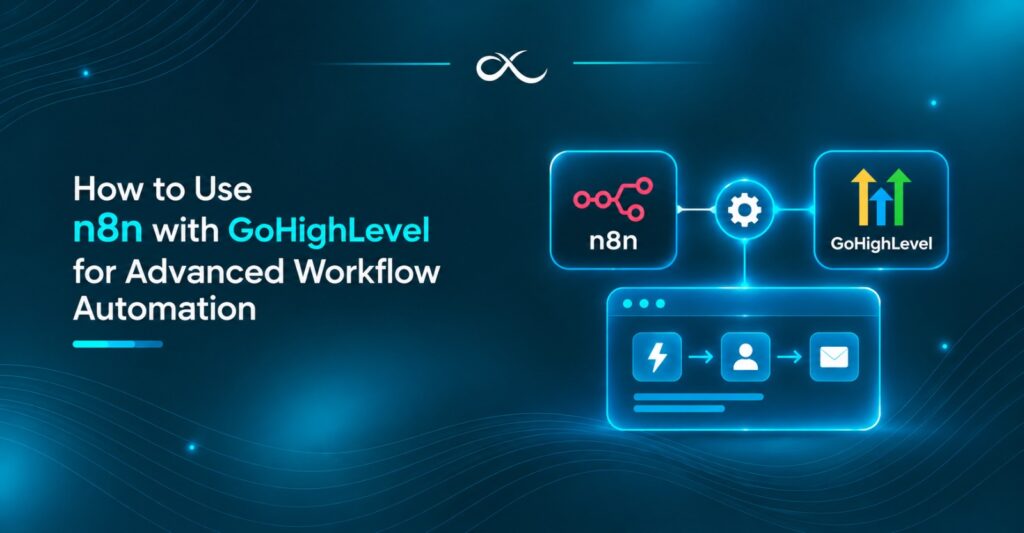
n8n is an open source automation platform that connects apps GHL cannot natively talk to, without needing a developer. Think of GHL as the engine that runs your client and sales workflows, and n8n as the connector that links that engine to everything else: Slack notifications, custom databases, Google Sheets reporting, or internal tools built specifically for your business.
With no-code onboarding workflows built in n8n, you can, for example, have a new client’s intake form automatically create a folder in Google Drive, post a summary in Slack, and log the client in an internal spreadsheet, all triggered by a single GHL webhook. No custom code, no developer on retainer.
Step by Step: Building an Automated Onboarding Sequence with GHL and n8n
Here is a simplified version of a build we walk clients through:
- Map your current onboarding steps. Write down every task, from the moment a deal closes or a hire is confirmed, to the point they are fully set up.
- Set your trigger in GHL. This is usually a pipeline stage change, a form submission, or a tag being applied to a contact.
- Build the core GHL workflow. Welcome email, task creation for your team, calendar booking link, and any contract or intake forms.
- Connect n8n for the extras. Use a webhook to pass client data from GHL into n8n, then let n8n handle folder creation, Slack alerts, or updates to tools GHL cannot reach directly.
- Add conditional branches. Route enterprise clients or senior hires down a slightly different path than standard ones.
- Test with a dummy record. Run the whole sequence end to end before pointing it at real clients or new hires.
- Monitor and refine. Check your dashboard weekly for any onboarding stuck at a specific stage and adjust the workflow.
For a deeper walkthrough of connecting GHL to Google Drive, Gmail, Calendar, and Slack specifically, see our guide on automating GoHighLevel client onboarding with Google Drive, Gmail, and Calendar.
Want this built for you instead of building it yourself?
AutoLoopers’ onboarding automation platform sets up your entire GHL onboarding system, portal, AI assistant, and dashboard included, so clients go live in about a day instead of a week.
Real Benefits of a Streamlined Onboarding Process
Once your streamlined onboarding process is live, the results tend to show up fast:
- Setup time drops from hours to minutes per client or hire
- New clients go live in days instead of a week or more
- Your team stops doing repetitive admin work and focuses on strategy
- Fewer dropped tasks means fewer angry emails and support tickets
- You get a clear, documented process that does not depend on one employee remembering every step
Businesses using customer onboarding automation software built around GHL and n8n commonly report cutting onboarding admin time by more than 90%.
Common Onboarding Automation Mistakes to Avoid
- Automating a broken process. If your manual process is messy, automating it just makes the mess move faster. Fix the process first.
- Skipping the human touch entirely. Automation should handle logistics, not replace every personal interaction. Keep a real call or message somewhere in the sequence.
- No fallback for stuck workflows. Always have a way to flag and rescue a client or hire who gets stuck mid sequence.
- Overcomplicating onboarding task automation with too many conditional branches before testing the basic flow first.
Why AutoLoopers for Your Onboarding Automation Platform
AutoLoopers builds AI powered automation systems for agencies, SaaS companies, e-commerce brands, and service businesses that are tired of manual setup work eating their week. Our team has built dozens of GHL and n8n onboarding systems for agencies, legal, and consulting firms that needed reliable, repeatable onboarding without hiring extra staff.
If you would rather have this built and tested for you, book a free consultation and we will map out exactly what your automated onboarding sequence should look like.
Conclusion
Manual onboarding might work when you are small, but it will not scale with you. Combining GHL’s pipeline power with n8n’s no-code flexibility gives you a system that onboards clients or employees consistently, quickly, and without constant babysitting from your team. Start by mapping your current process, automate the repetitive parts first, and expand from there.
Ready to stop losing hours to manual setup? Visit the AutoLoopers homepage to see how our automation systems can save your team time starting this month.
Frequently Asked Questions
What is onboarding workflow automation?
It is the use of software to automatically handle repetitive onboarding steps, like sending welcome emails, creating accounts, assigning tasks, and scheduling kickoff calls, without manual effort from your team.
Can GHL and n8n work together for onboarding?
Yes. GHL handles the core client and pipeline workflows, while n8n connects GHL to other tools like Google Drive, Slack, or custom databases that GHL cannot reach natively.
Is onboarding automation only for large companies?
No. Small agencies and businesses often benefit the most, since they usually have fewer staff members to handle manual setup work.
How long does it take to set up an automated onboarding sequence?
A basic GHL workflow can be built in a few hours. A full system with n8n integrations and conditional logic typically takes a few days, or about a day if built by an experienced team.
Does automating onboarding remove the personal touch with clients?
Not if it is designed correctly. The best systems automate logistics and admin work while keeping real calls, personal check-ins, and human support in place where it matters.